KueCam
EN
Launch app
Teleprompter for content creators

Speak to camera with confidence.

No more blank moments, no more wandering eyes. KueCam shows your script right below the webcam and moves it at the pace of your voice. Record, trim, add subtitles: your video is ready to post.

Free · No sign-up · Right in your browser

Made forTikTokReelsShortsYouTubeLinkedIn

On camera, everyone freezes at first

01

The blank moment

You know your topic, but in front of the lens the words vanish. With your script in front of you, you never lose your train of thought.

02

Wandering eyes

Reading notes beside the screen shows. The text sits at the very top, right against the webcam: your eyes stay on the lens.

03

Take number 15

The text waits when you pause and moves on when you continue. You speak at your own pace, stress-free, and the first take is often the one.

Everything you need to shoot, nothing you don’t

A prompter that listens, a pro set and express editing. In your browser, nothing to install.

Voice following

The text follows you, not the other way round

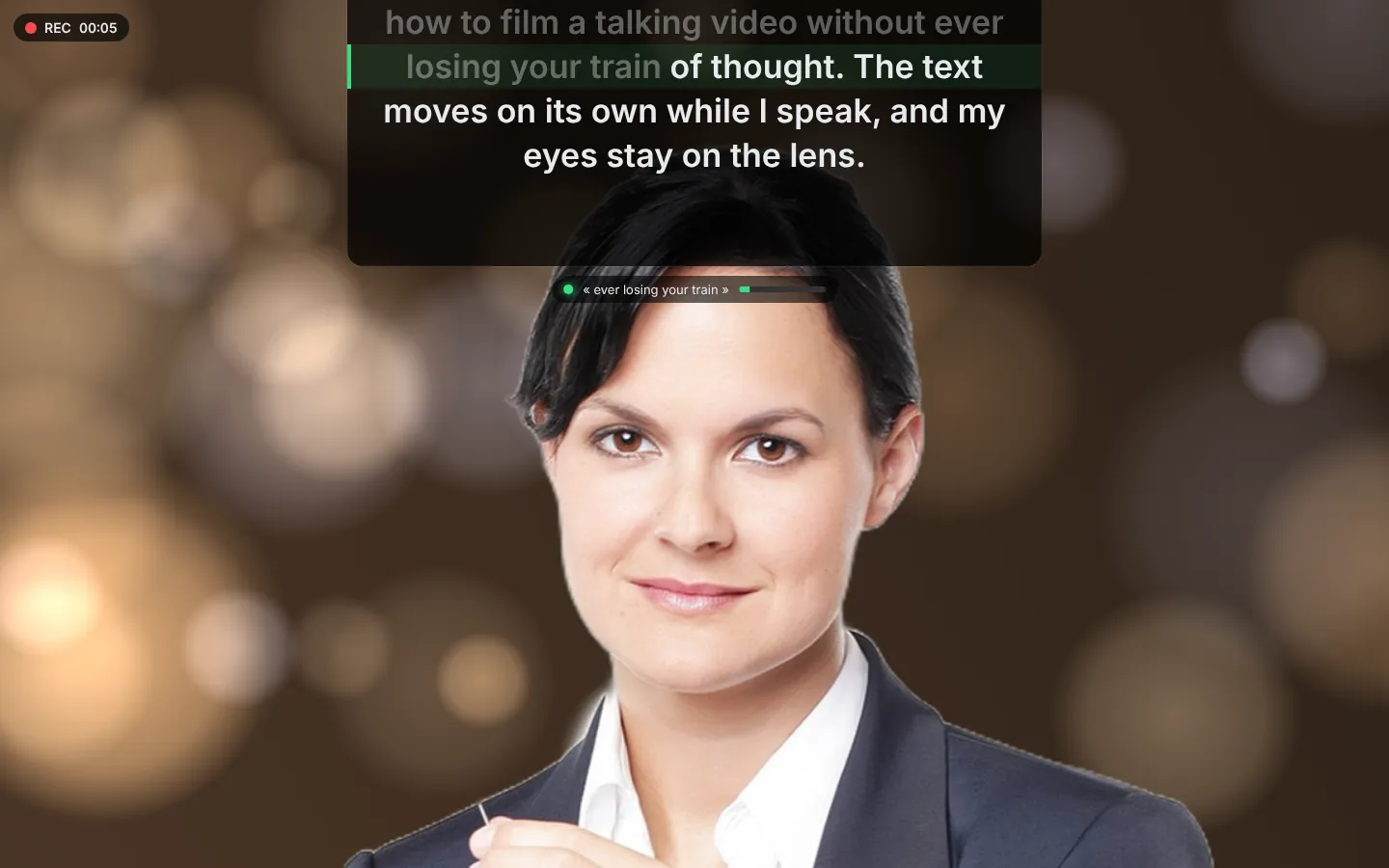
Speech recognition spots the words you say and scrolls the prompter at your speed. Throw in a joke? The text waits for you.

  • Highlighted reading line, spoken words greyed out
  • Click any word to pick up from there
  • Language detected automatically (7 languages)
The KueCam prompter follows the voice while recording, on a virtual background
Formats

A format for every platform

Pick your format before you film… or after: one take exports to 9:16, 1:1 and 16:9 in a single click.

  • 9:16 for TikTok, Reels and Shorts
  • 16:9 for YouTube and LinkedIn
  • “All 3 formats” in one click
16:9
9:16 · TikTok · Reels · Shorts16:9 · YouTube · LinkedIn1:1 · Instagram4:5 · Instagram · LinkedIn
Virtual backgrounds

A pro set, even from your bedroom

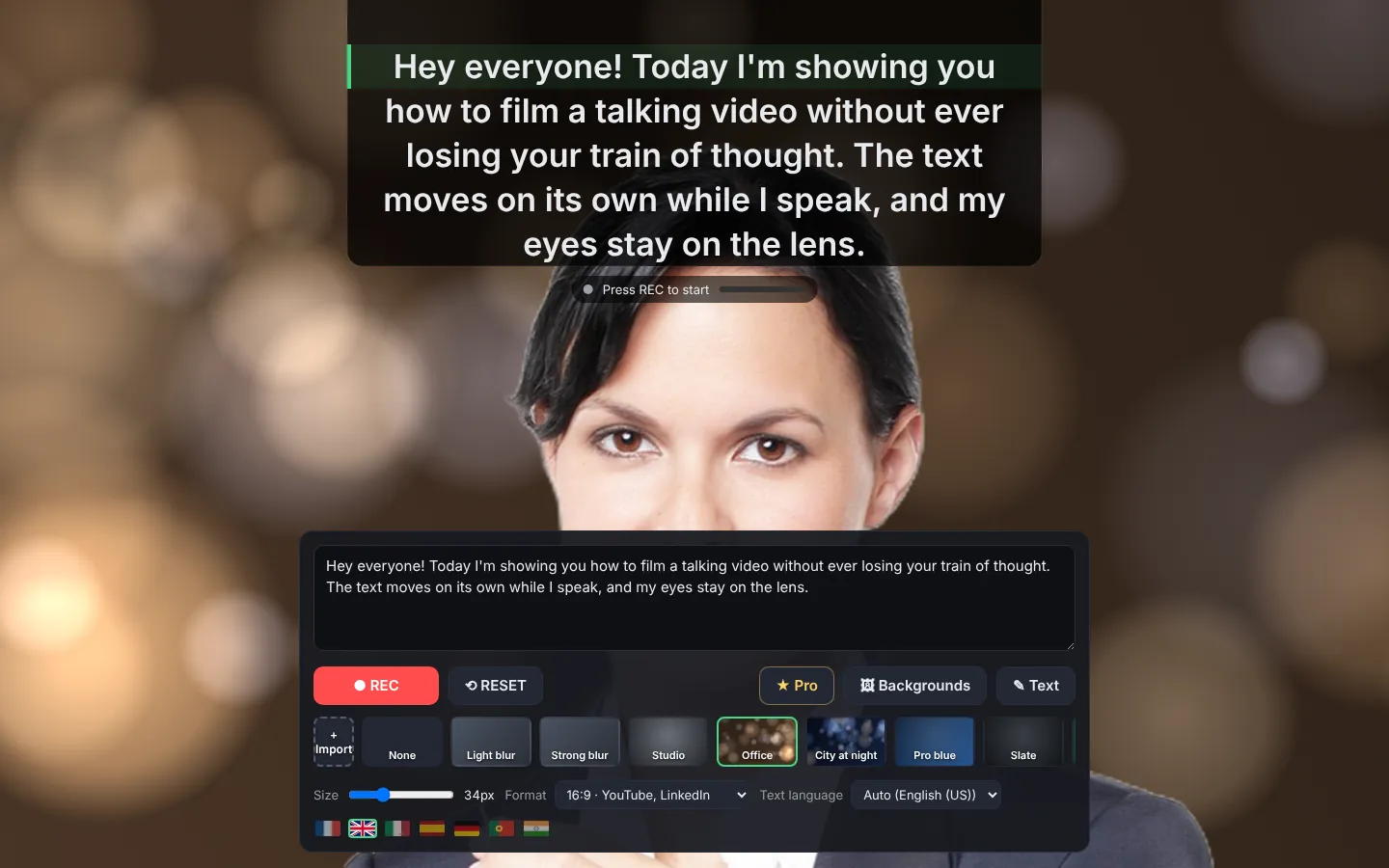
AI cuts you out live, like on Teams: blur, ready-made backgrounds or your own image. Nobody will see the laundry drying behind you.

  • Light or strong blur
  • Studio, Office, City at night backgrounds…
  • Import your own background image
Choosing a virtual background in KueCam
After the shoot

Pick, cut, post

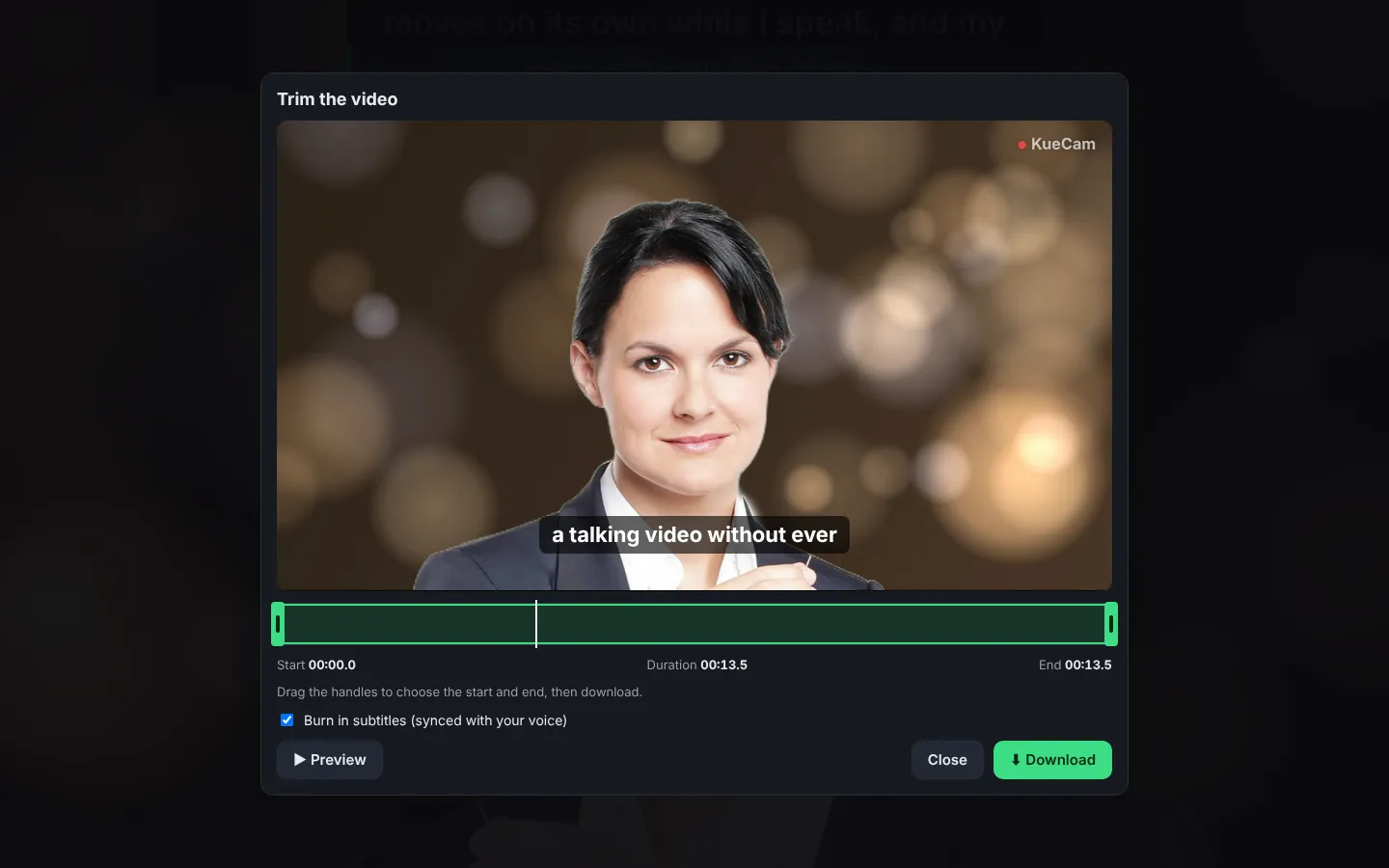
Keep your best take, trim the start and end with frame accuracy, add subtitles synced with your voice, then post in two taps.

  • Multiple takes, the best one wins
  • Subtitles = your exact script, key words in color
  • Share to TikTok, Instagram, LinkedIn and YouTube
KueCam editor: trimming and synced subtitles
Features

7 languages

Interface and speech recognition in French, English, Italian, Spanish, German, Portuguese and Hindi.

FrançaisEnglishItalianoEspañolDeutschPortuguêsहिन्दी
Features

Your videos stay with you

KueCam needs no account. Recording, virtual backgrounds, trimming and subtitles are all computed in your browser: the video is never uploaded to a server, it is downloaded straight to your computer. Only speech recognition goes through the browser’s service (Google for Chrome, Microsoft for Edge, Apple for Safari) to recognise your words.

The little details that make all the difference

Built to film faster, feel calmer and post without the hassle.

  • 3-2-1 countdown

    Time to settle in, breathe and smile before the text starts.

  • Edit right in the prompter

    Write or fix your script where you read it. Great on mobile: the keyboard hides nothing.

  • Stressed words in color

    Wrap a word in asterisks: it pops out in color in the prompter and in the subtitles.

  • Your logo in the video

    Import your logo and drag it with your mouse or finger exactly where you want it.

  • Multiple takes

    Every take is kept: compare them and keep the best one.

  • Mirror mode

    For teleprompters with a reflective glass: the text is flipped.

  • AI captions (Pro)

    A caption and hashtags for LinkedIn, TikTok, Instagram and YouTube, written from your script.

  • Post in two taps

    Share to TikTok, Instagram, LinkedIn, YouTube or YouTube Shorts in the right format, plus .srt and .vtt files.

Your video in 3 steps

  1. Write your script

    Paste or type your script right in the prompter. Put key words between asterisks.

  2. Press REC and talk

    Automatic full screen, the text moves with your voice.

  3. Pick and post

    Keep your best take, choose the format, add subtitles and your logo, then post.

KueCam

Confidence comes from preparation

Creators who look at ease on camera share a secret: they know exactly what they're going to say. KueCam gives you that safety net, invisibly. The text moves word by word with your voice, like this.

5 tips to feel at ease on camera

  1. Write the way you speak

    Short sentences, simple words: read aloud, your script should sound natural.

  2. Look at the lens, not the screen

    Picture one person behind the camera and talk to them directly.

  3. Smile from the first second

    The first seconds decide whether people keep watching: start with energy.

  4. Breathe between sentences

    Pauses make you look composed, and the text patiently waits for you.

  5. Keep the first good take

    Chasing perfection blocks you. A sincere take beats a perfect one.

All features

Everything KueCam can do, at a glance.
FeatureWhat it doesAvailability
Teleprompter below the webcamThe text is shown at the top centre of the screen, right below the camera, so you read while looking at the lens.Free
Scrolling that follows your voiceSpeech recognition spots the words you say and moves the text at your pace; it waits if you improvise.Free · Chrome, Edge, Safari
Automatic language detectionThe language of your script (French, English, Italian, Spanish, German, Portuguese, Hindi) is detected on its own, or picked by hand (US or UK English to match your accent).Free
Comfortable readingHighlighted reading line, words already read greyed out, lines never cut in half, adjustable text size and prompter width.Free
HD video recording with soundA single REC button starts both the recording and the prompter, in full screen. Up to 1080p depending on your webcam.Free (with watermark)
Video formats for every platform16:9 (YouTube, LinkedIn), 9:16 (TikTok, Reels, Shorts), 1:1 and 4:5 (Instagram, LinkedIn), chosen before or after filming.Free
Virtual backgrounds and blurAI background removal like Teams: light or strong blur, ready-made professional backgrounds or your own image.Free
Video trimmingAfter recording, cut the start and end with frame accuracy, with a preview.Free
Burned-in subtitles in syncSubtitles use your exact script and appear as you say each sentence.Free
Stressed words in colorWrite word between asterisks: it shows in color in the prompter and in the burned-in subtitles.Free
Multiple takesEvery take is kept with its trim: compare them and download the best one.Free
Multi-format exportThe same take in 9:16, 1:1 and 16:9 in one click, center-cropped, with logo and subtitles.Free
Subtitle files (.srt / .vtt)For YouTube or LinkedIn, matched to the trimmed video.Free
Your logo in the videoImport your logo, then place and resize it with your mouse or finger.Free
Countdown and mirror mode3-2-1 before each take; flipped text for reflective-glass teleprompters.Free
Posting to social networksDirect sharing from your phone (TikTok, Instagram, LinkedIn, YouTube…) or a link to the posting page on desktop.Free
AI captions and hashtagsA caption and hashtags tailored to LinkedIn, TikTok, Instagram and YouTube, written from your script.KueCam Pro
Interface in 7 languagesFrançais, English, Italiano, Español, Deutsch, Português and हिन्दी, switched with a click on a flag.Free
PrivacyNo account or sign-up. The video is recorded and processed in your browser, then downloaded to your computer.Free
Keyboard shortcutsSpace for REC / STOP, R to go back to the start, F for full screen, arrow keys to adjust the position.Free
Nothing to installWorks right in the browser on desktop, with no software or extension.Free
Pro versionVideos without the KueCam watermark, for your clients and brands.€4.99 / month

Free to start, Pro to go further

Try everything for free. Go Pro when you want to publish videos without a watermark.

Free

To get started on camera.

0 €
  • Teleprompter that follows your voice
  • HD recording, virtual backgrounds, formats
  • Trimming and burned-in subtitles
  • Small “KueCam” watermark on videos
Launch app
For creators

Pro

To publish videos that are 100% yours.

€4.99/ month
  • Everything in the free version
  • Watermark-free videos
  • AI captions and hashtags for each network
  • Perfect for clients and brands
  • No commitment, cancel anytime
★ Go Pro

Secure payment by Polar · No commitment

Frequently asked questions

What is KueCam?

KueCam is a free online teleprompter that shows your text below the webcam, scrolls it by following your voice and records your video, with virtual backgrounds, trimming and subtitles.

Is KueCam free?

Yes. KueCam is free and requires no sign-up. Recorded videos carry a small “KueCam” watermark. The Pro subscription (€4.99 / month, no commitment) removes the watermark.

How does the text follow my voice?

The browser’s speech recognition transcribes what you say; KueCam finds those words in your script and moves forward to them. If you improvise, the text waits. You can also click a word to resume from there.

Are my videos uploaded to the Internet?

No. The video is recorded and processed in your browser, then downloaded to your computer. Only the sound of your voice is analysed by the browser’s speech recognition service while recording.

Which browsers are supported?

Recent Chrome, Edge and Safari on desktop. Firefox lets you record, but the text cannot follow your voice.

What format is the video?

MP4 or WebM depending on the browser, both accepted by YouTube, LinkedIn, Instagram and VLC.

Can I blur or replace my background like on Teams?

Yes. Pick a light or strong blur, a ready-made professional background or import your own image; the background also appears in the recorded video.

Can I add subtitles?

Yes. After recording, tick “Burn in subtitles”: they use your exact script, synced with your voice, and words written between asterisks show in color. You can also download an .srt or .vtt file.

Which video formats can I create?

9:16 for TikTok, Instagram Reels and YouTube Shorts, 16:9 for YouTube and LinkedIn, 1:1 and 4:5 for Instagram and LinkedIn feeds. You can pick the format before filming (a frame shows the recorded area) or afterwards in the editor, and even download all 3 formats at once.

Can I add my logo to the video?

Yes. Click “Logo”: import your image (a transparent PNG works best), then move and resize it right in the frame. It is burned into all your videos, whatever the format.

How do I post to TikTok, Instagram, LinkedIn or YouTube?

On a phone, “Share video” opens the share menu: pick the app and the video goes straight there. On a computer, the network buttons download the video and open the posting page. The YouTube (16:9) and YouTube Shorts (9:16) buttons put the video in the right format automatically. With KueCam Pro, the AI also suggests a caption and hashtags for each network.

Your next video starts now

Paste your script, press REC and speak naturally. It's free.

Launch app